Gold Snowflakes Digital Papers Seamless Patterns: A Practical Evaluation for Designers and Crafters
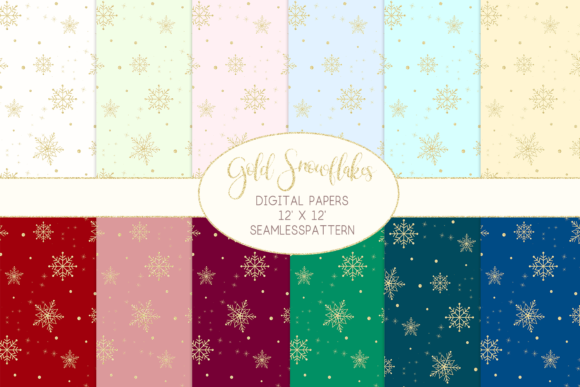
Gold Snowflakes Digital Papers Seamless Patterns is a curated digital paper pack designed for creators who need elegant, winter-themed backgrounds with metallic warmth. It includes 12 high-resolution JPG files—each measuring 12 inches by 12 inches at 3600 pixels square and rendered at 300 dpi in RGB color space. Unlike textured or hand-drawn snowflake patterns, this collection emphasizes clean, repeatable geometry with a subtle gold tone that balances festive charm and professional polish. The seamless tiling means users can extend the pattern infinitely across large-format projects without visible seams—a key requirement for print-on-demand products, scrapbook layouts, or digital invitations.
What Sets This Pack Apart from Other Winter-Themed Digital Papers
Many seasonal digital papers rely on heavy texture overlays, watercolor washes, or opaque white-on-blue schemes. Gold Snowflakes Digital Papers Seamless Patterns takes a different approach: it uses flat, vector-influenced snowflake motifs with carefully calibrated gold tones—not metallic foil effects, but rich, warm RGB golds that retain clarity when scaled or layered. Because each tile repeats smoothly, designers avoid manual blending or cloning to fill large areas—a time-saver especially noticeable when preparing greeting cards, social media banners, or printable wall art.
The decision to deliver exclusively in JPG format reflects a focus on broad compatibility. Unlike PNGs with transparency (which require extra steps to manage layers in non-designer software), these files drop in cleanly to Canva, Microsoft Word, Cricut Design Space, and Adobe Express. That said, users needing transparent elements—like overlaying snowflakes onto photos without a background—will need to convert or mask manually, since JPGs don’t support alpha channels.
Resolution and Color Considerations in Real-World Use
At 3600px × 3600px and 300 dpi, these files meet standard print requirements for up to 12×12 inch outputs. For example, a scrapbook page printed at full size retains crisp detail, and a 4×6 inch photo card scaled down from the original maintains smooth edges. However, if you’re working on oversized prints—such as a 24×36 inch canvas wrap—the pattern may begin to show repetition unless intentionally tiled with offset or rotation. That’s not a flaw, but a limitation inherent to any fixed-size seamless pattern; it simply means planning matters more than with procedural or algorithmic textures.
Color accuracy is another practical consideration. The description notes that “color may vary depending on your computer screen”—and this is both expected and important. RGB gold doesn’t translate directly to CMYK gold foil or metallic ink. On-screen, the gold reads as warm amber or antique brass; in physical print, especially on uncoated paper, it often softens toward a muted bronze. If your project depends on precise metallic fidelity—say, for luxury wedding stationery where gold foil stamping is part of the final output—this pack serves best as a design guide or digital mockup layer, not a direct print-to-foil substitute.
When Gold Snowflakes Digital Papers Seamless Patterns Fits—and When It Doesn’t
This pack shines in contexts where consistency, speed, and aesthetic cohesion matter more than absolute uniqueness. Think: batch-producing holiday email headers, building themed Canva templates for small businesses, designing cohesive sticker sheets for Etsy, or creating printable planner inserts with a unified winter motif. Its strength lies in reliability—not surprise. You know what you’ll get: 12 distinct but harmonized variations, all built to tile, all sized identically, all optimized for quick integration.
It’s less ideal for projects requiring deep customization per element. If you need to isolate individual snowflakes for cutting with a Cricut or Silhouette, you’ll need to extract them manually using selection tools—there are no layered PSDs or SVG cut files included. Similarly, if your workflow depends on editable vectors (e.g., resizing motifs without pixelation or changing colors via swatches), this JPG-only set won’t support that flexibility. In those cases, a vector-based alternative—or pairing this pack with a separate SVG snowflake library—may be more efficient.
Comparing Formats and Workflow Integration
Among digital paper formats, JPG remains the most universally supported—but also the most static. Compared to PNGs, it lacks transparency; compared to TIFFs, it uses lossy compression (though imperceptible at this resolution); compared to PDF pattern swatches or Procreate brushes, it offers no built-in brush dynamics or pressure sensitivity. That tradeoff is intentional: simplicity over specialization.
For users managing multiple design tools, this uniformity helps. You can use the same file in Photoshop for advanced compositing, in Affinity Designer for layout work, and in free tools like Photopea for basic edits—no format conversion needed. But if your process leans heavily on non-destructive editing (e.g., adjusting gold saturation globally across all 12 papers), you’ll need to batch-edit outside the pack or rely on software features like Lightroom presets or Photoshop actions.
Practical Use Cases and Realistic Expectations
A freelance graphic designer preparing a set of five holiday social media posts might use one Gold Snowflakes Digital Papers Seamless Pattern as a background layer, then overlay minimal text and product photography. Because the pattern is subtle—not overwhelming—the focus stays on the message. A teacher creating printable winter activity sheets could apply a lighter variant as a border frame, knowing it will print clearly on standard classroom printers.
Conversely, someone developing a textile design for fabric printing might find the 12×12 inch tile too small for large-scale repeats without interpolation. While possible to upscale, doing so risks softening fine details in the snowflake geometry. In that case, a custom-designed tile at native 600 dpi—or a service offering scalable vector repeats—would better serve long-term production needs.
Decision Factors to Weigh Before Choosing
Consider these questions before selecting Gold Snowflakes Digital Papers Seamless Patterns:
- Is seamless tiling essential? If you’re filling large areas without manual patching, yes—this pack delivers that reliably.
- Do you need transparency or layered control? If yes, supplement with masking tools or look for PNG or PSD alternatives.
- How critical is exact gold color matching? If brand guidelines demand Pantone-level precision, treat these as directional references—not final output files.
- What’s your primary output medium? For digital use (websites, social, emails) or standard home/office printing, it’s well-suited. For specialty substrates (metallic paper, fabric, vinyl), test a sample first.
- How much time do you have for prep work? If minimizing setup time is a priority, the consistent sizing and format reduce friction. If you regularly tweak individual elements, expect some manual refinement.
Ultimately, Gold Snowflakes Digital Papers Seamless Patterns occupies a specific niche: dependable, aesthetically cohesive, production-ready winter texture for creators who value clarity over complexity. It doesn’t try to be everything—nor should it. Its value emerges not in versatility alone, but in how thoughtfully its constraints align with common real-world tasks. Whether you’re evaluating it against other seasonal packs, weighing format tradeoffs, or deciding how it fits into an existing toolkit, keeping those practical boundaries in view helps ensure it supports your goals—not complicates them.