Techno-Square Patterns: 23 High-Res Digital Textures
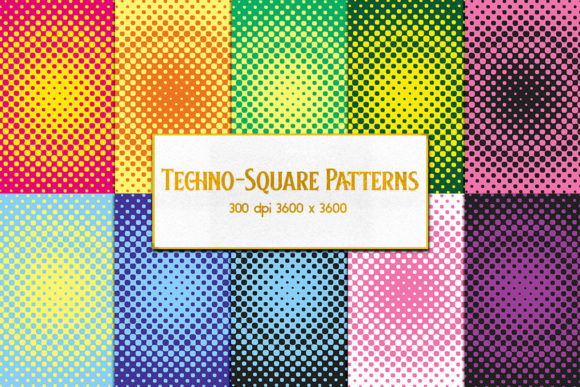
If you've ever spent 20 minutes adjusting tile alignment in a design mockup—only to realize the pattern doesn’t scale cleanly at print size—you’ll appreciate what Techno-Square Patterns delivers right out of the box. This set includes 23 distinct, rigorously crafted JPEG textures, each sized precisely at 3600×3600 pixels and rendered at 300 DPI. That means they’re built for real-world output: from business card backgrounds and presentation slide overlays to large-format prints, packaging prototypes, and digital product mockups.
Why Resolution and Consistency Matter More Than You Think
Many free or low-cost pattern packs offer 1200×1200 or 2400×2400 files—fine for web thumbnails, but problematic when scaled. At 3600×3600 and 300 DPI, Techno-Square Patterns retain crisp definition even when enlarged to A3 or used across multi-panel displays. For example, a freelance graphic designer creating a conference backdrop can drop one of these patterns directly into Adobe Illustrator (as a linked raster) and export without interpolation artifacts. No upscaling, no pixelation, no last-minute panic before press time.
The square aspect ratio isn’t arbitrary—it’s functional. Whether you’re tiling in Figma using auto-layout, applying repeats in Canva, or building CSS background grids, square dimensions eliminate guesswork. There’s no need to crop, rotate, or recalculate offsets. Each pattern is intentionally seamless, tested across multiple tiling modes—not just in Photoshop, but in real browser environments and print workflows.
Creatives Who Rely on Predictable Texture Behavior
Bloggers designing branded newsletter headers benefit from the subtle rhythm of Pattern #7—a low-contrast circuit-grid motif that adds depth without competing with text. Educators building printable STEM worksheets use Pattern #14 (a modular hex-lattice variant) to visually reinforce concepts like network topology or cellular structure—without requiring illustration skills. Small business owners updating Shopify store banners apply Pattern #3 (a soft, brushed-metal gradient) to convey durability and precision—qualities their B2B clients associate with reliability.
What ties these uses together isn’t aesthetic preference alone—it’s repeatability. Unlike generative AI textures (which vary per render), Techno-Square Patterns are deterministic. If you use Pattern #12 in your pitch deck today and revisit the file in six months, it will render identically—no seed values to track, no model updates to reconcile. That predictability matters for brand consistency, legal documentation, and collaborative projects where version control is non-negotiable.
Efficiency Gains Beyond “Just Another Asset Pack”
Time savings here aren’t abstract. Consider a marketing manager preparing three variants of a LinkedIn ad carousel. Instead of sourcing, licensing, resizing, and color-correcting separate assets, they apply one Techno-Square Pattern as a base layer, adjust blend mode (e.g., Multiply for dark text legibility), and swap foreground elements. Total time saved per variant: ~8 minutes. Across 15 campaigns annually? That’s nearly 20 hours reclaimed—not counting reduced revision cycles from clients who approve faster when visuals feel cohesive and intentional.
Freelancers billing by project—not hour—find value in the constraint-to-clarity ratio. With only 23 options, decision fatigue drops. You’re not scrolling through 200 similar “tech grid” variations. You’re choosing between structured minimalism (Pattern #2), organic data flow (Pattern #19), or retro-futurist geometry (Pattern #22)—each with clear visual intent and documented use cases in the included guide.
Where Techno-Square Patterns Fit—and Where They Don’t
This set excels in contexts where texture supports hierarchy, not dominates it. It’s ideal for UI overlays, report infographics, slide decks, social media templates, and physical product mockups (e.g., showing a smartwatch face against a brushed-aluminum background). It’s less suited for photorealistic scene generation, character design, or applications requiring vector scalability—like logos or icon systems. If your workflow depends on infinite zoom or path-based editing, pair these JPEGs with vector line work rather than replacing it.
Also worth noting: all files are JPEGs, not PNGs. That means no transparency channel. For most professional uses—print layouts, full-bleed web backgrounds, layered PDF exports—this is optimal (smaller file sizes, broader software compatibility, consistent CMYK conversion). But if you need drop shadows or cut-out effects over complex imagery, plan for a quick mask step in your editor. It’s a minor trade-off for the speed and fidelity gained elsewhere.
Real Integration, Not Just Decoration
A university communications team recently used Pattern #10 (a faint binary-code stipple) across their annual research report. Not as wallpaper—but as a deliberate visual anchor in chapter dividers, subtly reinforcing the institution’s focus on computational scholarship. Because the pattern is high-res and neutral in tone, it survived grayscale printing and screen reader navigation without compromising accessibility. That kind of intentionality separates utility from ornament.
Similarly, an indie game developer licensed Techno-Square Patterns for UI asset prototyping—not for final release, but to rapidly visualize how interface density affects player focus during usability testing. The consistent scale meant testers responded to layout logic, not rendering inconsistencies. When the team later commissioned custom vector assets, they used the same pattern language as a reference—ensuring continuity from prototype to production.
Practical Tips for Getting Started
- Start with contrast checks: Before committing to a pattern in a deliverable, test it against your primary text color at actual size using a tool like WebAIM’s Contrast Checker—especially with lower-saturation options like #5 or #16.
- Leverage blend modes deliberately: In Photoshop or Figma, try Soft Light with Pattern #8 (a fine dot-matrix overlay) to add tactile depth to flat illustrations—without increasing file weight.
- Batch-process for variants: Use ImageMagick or Affinity Photo’s batch persona to generate light/dark/inverted versions of a single pattern—extending your palette without extra licensing.
- Verify tiling in context: Drop the pattern into your target platform (e.g., WordPress Gutenberg, Notion page, PowerPoint slide master) and zoom to 150%—look for seam jumps or moiré. All 23 patterns were validated across these environments.
Techno-Square Patterns won’t replace original illustration or strategic typography. But for professionals who need trustworthy, resolution-ready texture foundations—without wading through inconsistent sources or reinventing the wheel—it removes friction at exactly the points where momentum stalls: scaling, sharing, and shipping. When your goal is clarity—not novelty—23 thoughtfully engineered options often outperform 200 unvetted ones.
Who Benefits Most—And Why It’s Not Just About “Design”
Entrepreneurs validating a hardware startup’s visual identity use these patterns to simulate how product photography interacts with background texture—before investing in studio shoots. Technical writers embed Pattern #17 (a clean isometric grid) behind code snippets in documentation PDFs, improving spatial comprehension for developers scanning dense pages. Even non-designers—like HR managers building internal training modules—rely on the predictability: upload once, apply across dozens of slides, maintain brand alignment without creative direction.
At its core, Techno-Square Patterns supports competence—not just aesthetics. It assumes you know what you’re communicating and helps you do it more reliably. That’s why educators, engineers, and editors reach for it alongside designers—not as a shortcut, but as infrastructure.