15 Monochrome Star Patterns: Seamless, Scalable Assets for Real-World Design Workflows
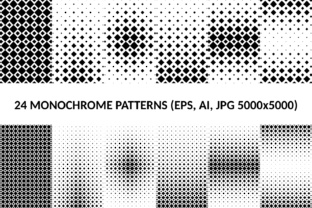
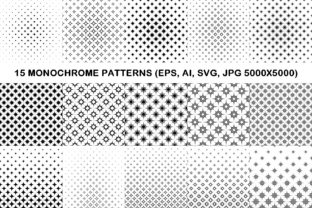
Monochrome star patterns serve a quiet but critical role in visual communication—especially when clarity, consistency, and adaptability matter. The 15 Monochrome Star Patterns package delivers precisely that: a curated set of 15 distinct, hand-crafted star-based designs rendered in clean black-and-white contrast, built for flexibility across platforms and stages of production. Unlike generic clipart or algorithmically generated repeats, these patterns are intentionally designed to be both visually cohesive and functionally robust—each one tested for seamless tiling, vector fidelity, and high-resolution output.
Where These Patterns Fit in Your Creative or Production Process
These aren’t standalone decorative elements. They’re modular components that slot into existing workflows—whether you’re designing a brand identity system, preparing course materials, building a Shopify theme, or producing print-on-demand products. Their monochrome nature removes color-matching friction; their curved, organic star forms add subtle sophistication without overwhelming hierarchy. Because they’re delivered in AI, EPS, SVG, and JPG (5000×5000 px), they integrate cleanly whether your team uses Adobe Creative Cloud, Figma, Canva, or open-source tools like Inkscape.
For example, a freelance web designer might use one of the SVG patterns as a subtle background texture behind a hero section—scaling it infinitely without loss. A small business owner launching a new stationery line can embed an EPS version directly into Illustrator for embossed letterhead, then repurpose the same file for social media banners by exporting a JPG variant at exact dimensions. An educator creating printable worksheets applies a light gray-on-white star pattern as a non-distracting page border—adjusting opacity in PowerPoint or Google Slides without needing to re-import assets.
Preparation: What You Need Before Using Them
No setup is required—but thoughtful preparation improves long-term reuse. First, verify your software supports the formats you plan to use: AI and EPS files require vector-editing applications (Illustrator, Affinity Designer); SVG works natively in browsers and modern design tools; JPG is best for static placement where scaling isn’t needed. Second, organize them early. Create a dedicated folder labeled “Monochrome Star Patterns” and subdivide by format if your team shares assets—this avoids version confusion later.
Third, consider your output context before editing. If you’ll export for web, prioritize SVG or optimized JPG. For large-format print (e.g., trade show backdrops), work from AI or EPS to retain vector scalability. And because all 15 patterns are monochrome, avoid converting them to grayscale unless necessary—you’ll preserve crisp edges and consistent contrast across devices and printers.
Integration Across Tools and Teams
The real value of 15 Monochrome Star Patterns emerges in cross-platform compatibility. A marketer building email campaigns in Mailchimp can paste an SVG directly into a custom HTML block; a publisher using Adobe InDesign imports EPS files with full editability—including adjusting stroke weight or spacing between repeat units. Even non-designers benefit: bloggers using WordPress can upload the JPGs as full-width backgrounds in page builders like Elementor, then overlay text with sufficient contrast thanks to the strong black/white distinction.
Collaboration improves when assets behave predictably. Since every pattern is truly seamless—no visible seams at tile boundaries—designers don’t waste time manually adjusting offsets. Developers appreciate the clean SVG paths (no embedded raster layers or unnecessary groups), making it easier to style via CSS or animate with JavaScript. And because each pattern is individually named (e.g., “Star_Curve_07.ai”), version control and asset tracking stay straightforward—even in shared cloud folders or CMS libraries.
Practical Implementation Tips for Consistent Results
- Test tile behavior first. Open any SVG or AI file and duplicate the artboard four times in a grid. Zoom in at 400% to confirm no misalignment or pixel fringing occurs at junctions—this confirms true seamlessness.
- Adjust scale—not resolution. When resizing JPGs for different outputs, use vector originals instead. Scaling a 5000×5000 JPG down to 800×800 is safe; upscaling introduces blur. Always go vector-to-raster, not the reverse.
- Preserve contrast in layered compositions. If placing text over a pattern, use the white version on dark backgrounds and black on light ones—or invert programmatically in CSS using
filter: invert(1)where supported. - Batch-export only what you need. Use Illustrator’s “Export for Screens” or Inkscape’s “Export PNG” dialog to generate multiple sizes from one AI file—avoid saving 15 separate JPGs manually.
Branding & Identity Development
During mood board creation, drop three contrasting star patterns (e.g., tight curve, wide curve, radial variation) into a Figma frame alongside typography samples and palette swatches. This reveals how rhythm and density affect perceived brand tone—playful vs. refined, energetic vs. grounded—before committing to final lockups.
Educational Resource Creation
When building downloadable PDF worksheets, apply a low-opacity star pattern (via Illustrator’s Transparency panel) as a watermark layer beneath content. It adds visual interest without interfering with readability—and because it’s monochrome, it prints cleanly on any home or school printer.
Digital Product Packaging
For SaaS dashboards or app interfaces, use a single SVG pattern as a subtle background for empty states (“No notifications yet”). Its geometric familiarity reassures users while avoiding visual clutter—more effective than stock illustrations or abstract gradients.
Long-Term Usability and Quality Control
These patterns hold up over time because they avoid trend-dependent details: no gradients, no textures, no blended modes. That means they won’t look dated in two years—and they adapt effortlessly to evolving brand guidelines. To maintain quality control, treat them like any core asset library: document usage rules (e.g., “Minimum scale: 120% of original tile size for print”), store source files separately from exports, and audit usage annually to retire underperforming variants.
Also note: all 15 patterns were created with intentional variation in curvature radius, node distribution, and negative space ratio. This isn’t random diversity—it’s functional diversity. One pattern may suit tight packaging labels; another works better as a full-page web background. Understanding those distinctions prevents overuse of a single favorite and encourages intentional selection based on context—not convenience.
Making Integration Effortless
Start small. Pick one pattern and one recurring task where visual repetition currently feels flat or inconsistent—a newsletter footer, slide deck template, or product label layout. Replace the existing element with the vector version, adjust scale and tiling to match your grid, and assess impact over a week of real use. If it improves clarity or reduces revision cycles, expand to two more patterns in adjacent workflows.
Don’t treat 15 Monochrome Star Patterns as decoration. Treat them as infrastructure—like typography choices or spacing systems. They support communication rather than distract from it. When used with intention, they reduce decision fatigue, accelerate production, and reinforce visual cohesion across touchpoints—without demanding additional learning, licensing, or maintenance.
That’s the practical advantage: not novelty, but reliability. Not complexity, but precision. Not ornamentation, but utility—woven quietly into the fabric of how you build, teach, sell, publish, and create.