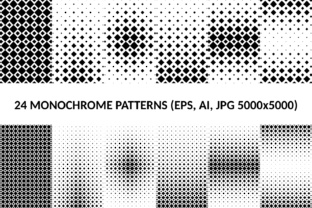
15 Square Monochrome Patterns: Clean, Versatile Design Assets for Real Projects
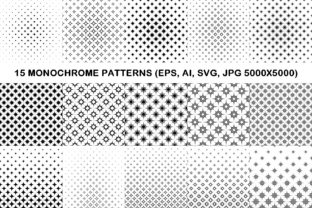
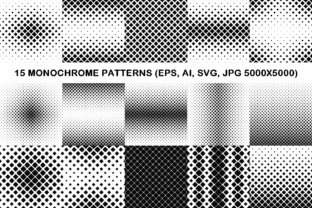
If you've ever spent 20 minutes searching for a subtle, scalable background that doesn’t distract — or needed a consistent texture for a branding rollout across print and digital — then 15 Square Monochrome Patterns is the kind of resource that quietly solves problems before they escalate. It’s not flashy. It’s not trend-chasing. It’s a focused, practical toolkit: 15 thoughtfully crafted square-based monochrome patterns, delivered in four essential formats — AI, EPS, SVG, and high-res JPG (5000×5000 pixels).
What You’re Actually Getting — and Why Format Variety Matters
This isn’t just “15 black-and-white repeats.” Each pattern is built as a seamless, tileable square — meaning it repeats cleanly in any direction without visible seams or misalignments. That’s non-negotiable for backgrounds, packaging wraps, or UI overlays. The package includes:
- 15 vector AI files — ideal for Adobe Illustrator users who need to edit colors, adjust spacing, or integrate into larger brand systems;
- 15 vector EPS files — compatible with older design software and widely accepted by commercial printers;
- 15 vector SVG files — perfect for web developers embedding responsive, lightweight patterns directly into CSS or HTML;
- 15 JPG files (5000×5000) — high-resolution raster versions ready for immediate use in presentations, mockups, or platforms that don’t support vectors.
The format flexibility means you’re not locked into one workflow. A graphic designer can tweak spacing in Illustrator, a web developer can drop an SVG into a background-image rule, and a marketing manager can paste the JPG into a Canva social post — all using the same underlying pattern logic.
Where These Patterns Show Up in Everyday Work
Monochrome square patterns thrive where clarity, consistency, and quiet sophistication matter — not where attention-grabbing chaos does. Here’s where people actually reach for them:
Branding & Identity Systems
Startups and small studios often need subtle texture to add depth to minimalist logos or stationery — without compromising scalability. A light dot grid or fine-lined crosshatch from the 15 Square Monochrome Patterns set works beautifully behind letterheads, business cards, or email footers. Because they’re monochrome, they adapt instantly to brand color palettes via simple recoloring in vector editors — no need to hunt for “matching” versions.
Web & App Interfaces
UI designers use these patterns as low-contrast background elements behind cards, modals, or dashboards. Unlike photos or gradients, a clean square pattern adds visual rhythm without competing with content. One UX lead we spoke with uses the “thin diagonal line” pattern as a subtle overlay on data tables — it improves scannability without adding cognitive load. SVG delivery makes implementation fast and resolution-independent.
Packaging & Print Design
For product boxes, labels, or retail hang tags, texture builds perceived quality. A matte-finish box with a barely-there geometric repeat (like the “offset square lattice” pattern) signals craftsmanship — especially when printed on uncoated stock. Since EPS files are included, prepress teams can place them confidently, knowing they’ll hold up at any size — from a 2″ label to a 48″ shelf banner.
Presentation & Pitch Materials
Slides often suffer from either sterile emptiness or visual clutter. A soft monochrome pattern as a slide background — applied at 5–10% opacity — adds dimension while keeping text fully legible. The 5000×5000 JPGs scale cleanly even in ultra-wide 16K presentation exports, avoiding pixelation that plagues smaller raster assets.
Who Benefits — and How Their Needs Differ
A freelance illustrator might use the AI files to deconstruct spacing logic and build custom variants. A corporate communications manager may only ever open the JPGs — but appreciates having crisp, ready-to-drop assets for internal decks. A front-end developer values the SVGs for performance and responsiveness. And a print production specialist relies on the EPS versions to ensure spot-color accuracy and RIP compatibility.
Even non-designers find value. Educators building course workbooks use the patterns as section dividers or page borders. Architects apply them as subtle surface treatments in render overlays. Craft entrepreneurs emboss them onto notebook covers or laser-cut them into acrylic signage templates.
Things to Keep in Mind Before You Use Them
While versatile, these patterns aren’t universal fixes. Here’s what helps them land well:
- Contrast matters: Monochrome doesn’t mean “invisible.” Test pattern + text combinations for readability — especially with lighter grays on white or dark grays on black. Some patterns (like the dense stipple) work better as accents than full backgrounds.
- Scale is contextual: A pattern that reads beautifully at 12pt on a business card may vanish at 24pt on a poster. Preview at actual output size — the 5000×5000 JPGs give plenty of headroom, but vector files let you dial in exact repeat dimensions.
- Consistency > variety: Using more than 2–3 patterns across one project can dilute cohesion. Many users pick one primary pattern for core branding and reserve others for specific contexts — like a distinct pattern for invoices versus social banners.
- Not all monochrome is equal: These patterns use true grayscale vectors — no embedded RGB profiles or transparency tricks. That ensures reliable output whether you’re exporting to CMYK press or exporting to a dark-mode web theme.
Strengths That Stand Out in Practice
What makes this set feel different from generic pattern packs? First, the square constraint creates predictable tiling behavior — no awkward cropping or forced scaling. Second, the monochrome palette removes color-matching guesswork, letting you focus on composition and hierarchy. Third, the multi-format delivery bridges gaps between tools and teams — something many designers cite as a daily friction point.
One interior designer told us she uses the “minimal grid” pattern as a base layer in mood boards — then layers fabric swatches and furniture renders on top. “It gives structure without shouting,” she said. “Clients notice the polish, not the pattern.”
A Note on Limitations — So You Can Plan Around Them
These are square monochrome patterns, not photorealistic textures, animated assets, or color-rich motifs. If your project demands warmth, organic variation, or vibrant contrast, this set won’t fill that need — and isn’t meant to. Likewise, they’re designed for professional workflows, not drag-and-drop template builders with limited file support. If your platform only accepts PNG uploads under 5MB, the JPGs will serve you well; if you need transparent backgrounds, you’ll want to export SVGs or recreate transparency in your editor.
They also assume basic familiarity with vector editing or layout software. There’s no “one-click install” plugin — but there doesn’t need to be. This is a precision tool, not a shortcut.
Real Work, Not Just Pretty Files
At its core, 15 Square Monochrome Patterns supports intentionality. It helps you say something with restraint — whether that’s “this brand values clarity,” “this interface respects your attention,” or “this packaging feels considered, not mass-produced.” It’s the kind of asset you forget you’re using — until someone asks, “How did you make this feel so cohesive?”