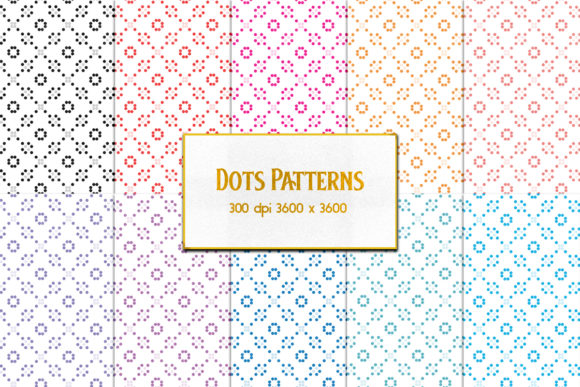
Dots Patterns: Clean, Versatile, and Ready When You Need Them
Whether you’re designing a presentation slide for a team meeting, laying out a custom notebook cover, or prepping a social media post for your small business, background texture matters. Not flashy—just right. Dots Patterns delivers exactly that: subtle, scalable, and consistently crisp dot-based designs built for real work. No guesswork, no pixelation, no last-minute scrambles to find something “neutral but not boring.”
What Dots Patterns Actually Is (and Why It’s Not Just Another Background Pack)
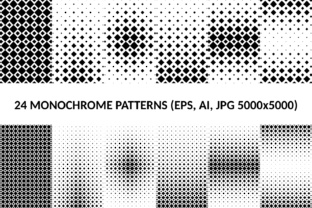
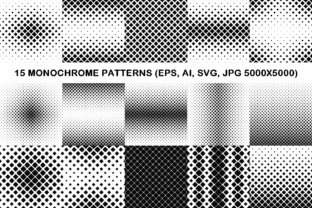
Dots Patterns is a focused collection of 14 high-resolution JPEG files—each sized at 3600×3600 pixels and saved at 300 DPI. That means they’re print-ready *and* screen-sharp, whether you drop one into Canva, Adobe Photoshop, Figma, or even Microsoft Word. They’re not vector files or layered PSDs—these are flat, optimized JPEGs designed for speed, compatibility, and reliability. Think of them as the quiet utility players in your design toolkit: always on standby, never overcomplicating things.
Where These Patterns Show Up in Real Life (Not Just Mockups)
You’ll reach for Dots Patterns when practicality outweighs novelty—and that happens more often than you think.
- Small business owners use them to brand printed materials without hiring a designer: think letterhead, invoice backgrounds, or packaging inserts. A light gray dot pattern behind your logo on a thank-you card adds polish—not distraction.
- Educators and trainers embed them into handouts and worksheets to reduce visual fatigue. A soft black-on-white dot grid (not a solid fill) helps students focus on content while giving the page gentle structure.
- Bloggers and content creators apply them as subtle overlays on featured images—especially for quote graphics or podcast episode thumbnails. The dots add depth without competing with text or faces.
- Freelancers and agencies use them as neutral base layers in client presentations. Instead of defaulting to white slides (which can feel sterile), a barely-there dot pattern adds warmth and professionalism—without needing to explain the design choice.
- Hobbyists and crafters print them onto sticker paper or fabric transfer sheets. Because they’re 300 DPI and square, they tile cleanly across surfaces like journals, phone cases, or ceramic mugs—no awkward seams or blurry edges.
Why Resolution and Dimensions Matter More Than You Might Expect
That 3600×3600 size at 300 DPI isn’t arbitrary—it’s calibrated for flexibility. At this resolution, you can scale down for web use (e.g., 1200×1200 for Instagram posts) without losing clarity, or scale up for large-format prints (like 24×24-inch framed art) and still retain smooth, consistent dot spacing. Unlike low-res patterns that turn grainy or pixelated when enlarged, these hold their shape. And because they’re JPEGs—not PNGs with transparency—you get predictable, lightweight files that open instantly in any app, on any device, even older versions of PowerPoint or Pages.
Real Scenarios Where Dots Patterns Solve Actual Problems
You’re launching a new online course. You need a cohesive look across your sales page, email headers, and downloadable workbook. Using the same light beige dot pattern across all assets creates continuity—without requiring custom illustrations or licensing fees.
Your café just launched seasonal pastries. You snap a photo of your lavender honey scone, then overlay a faint cream-colored dot pattern as a background layer in your Instagram Story. It grounds the image, adds texture, and subtly reinforces your brand’s handmade, thoughtful vibe—no extra fonts or logos needed.
You’re helping your child prepare a science fair board. Instead of a plain white foam board, you print one of the darker dot patterns onto matte photo paper, cut it to size, and mount it behind the title section. It makes headings pop, keeps judges’ eyes moving through the content, and looks polished—even if the rest of the board is assembled with glue sticks and index cards.
Who Benefits Most—and How Their Needs Shape Use
A graphic designer might use Dots Patterns as a starting point for custom textures—tweaking contrast or color in seconds before exporting a unique variant. A teacher might drag one straight into Google Slides and use it as a slide master background for the whole semester. A solopreneur running a wellness coaching practice may use the charcoal dot pattern as a subtle backdrop for monthly newsletter banners—consistent, calm, and never distracting from the message.
The common thread? All of them value time, control, and consistency—not complexity. They don’t need 50 variations. They need 14 reliable options that behave the same way every time they’re opened, resized, or printed.
What to Consider Before You Download or Apply
First, check your intended output. If you’re printing posters or large signage, confirm your printer supports 300 DPI input—most modern office and pro printers do, but some budget models perform better with 150–200 DPI. Second, consider color mode: these are RGB JPEGs, ideal for digital use and most inkjet printers. For offset printing with Pantone-matched inks, you’d convert later—but that’s a refinement step, not a barrier to starting.
Also, keep file naming simple. Rename each pattern meaningfully—dots-light-gray-300dpi.jpg, not IMG_9876.jpg. That saves minutes every time you search for “the one with tighter spacing” or “the warm-toned version.” And if you plan to use them commercially (e.g., on products you sell), double-check the license—most Dots Patterns collections include broad commercial rights, but always verify scope: does it cover physical goods? Reselling as part of a template pack? Those details matter when your side hustle becomes your main income.
When Simplicity Isn’t Minimalism—It’s Strategy
Dots Patterns works because it doesn’t shout. It supports. It frames. It gives breathing room without emptiness. In a world where attention is fragmented and tools multiply daily, having 14 dependable, high-fidelity textures—ready to drop in, scale up, or print out—isn’t a luxury. It’s infrastructure. It’s the difference between spending 20 minutes hunting for “just the right background” and spending that time refining your message, testing your layout, or connecting with your audience instead.
So yes—they’re dots. But they’re also confidence. Consistency. Quiet competence. And for anyone who builds, teaches, sells, shares, or creates, that kind of reliability isn’t small. It’s essential.