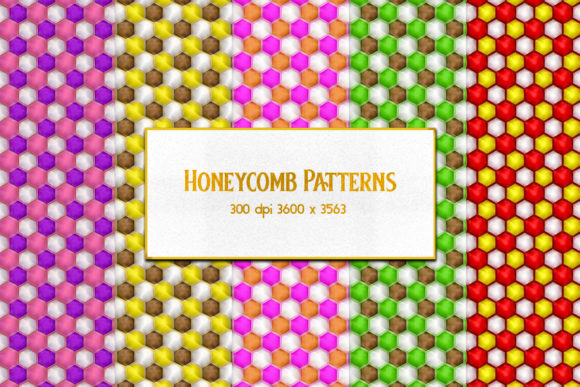
Honeycomb Patterns: A Strategic Design Resource for Purpose-Driven Work
Honeycomb Patterns are more than decorative repeats—they’re a structured visual language rooted in geometry, efficiency, and natural systems. When delivered as a curated set of 16 JPEG patterns at 300 DPI and 3600×3563 pixels, they become a high-fidelity, production-ready asset—not just for designers, but for anyone building tangible outcomes: brand identities, learning materials, packaging, digital interfaces, print collateral, or physical products.
Why This Specific Set Matters Strategically
Not all pattern libraries deliver equal utility. This set stands out because of its technical precision and intentional scope. At 300 DPI, every pattern retains crisp fidelity when scaled for large-format printing—think trade show banners, wall graphics, or fabric prototypes. The uniform 3600×3563 dimension ensures seamless tiling across platforms without manual cropping or resampling. And with 16 distinct variations—ranging from minimalist monochrome hex grids to layered, tonal, or textured interpretations—you gain flexibility without fragmentation.
That balance—between consistency and variation—is where strategic value begins. Too few options limit adaptability; too many invite decision fatigue and dilute visual cohesion. Sixteen is a working number: enough to support nuanced expression across contexts, yet small enough to maintain control over tone, hierarchy, and recognition.
When Honeycomb Patterns Support Real Goals—And When They Don’t
Honeycomb Patterns work best when aligned with an explicit objective—not as aesthetic garnish, but as functional scaffolding. Consider these grounded use cases:
- Brand systems: A honeycomb grid can structure content layouts (e.g., service cards, feature grids, team bios), reinforcing order and interconnection—especially powerful for B2B tech, sustainability, or education brands emphasizing collaboration or systems thinking.
- Learning & training materials: The inherent modularity supports chunked information design—each hexagon can represent a concept, step, or competency, making complex frameworks (like skill ladders or process maps) easier to absorb and retain.
- Product packaging & merchandising: High-resolution honeycomb backgrounds add tactile sophistication without overwhelming product messaging—ideal for premium skincare, artisan food, or eco-conscious goods where texture implies care and intention.
- Internal operations: Use subtle variants as background layers in dashboards or planning templates to visually segment workflows (e.g., one pattern for planning, another for review, a third for execution) without relying on color alone—a practical accessibility win.
Conversely, Honeycomb Patterns lose strategic ground when applied without context. Slapping a dense, high-contrast hex grid behind body text harms readability. Using the same pattern across every customer touchpoint—email headers, invoices, social posts—without variation flattens hierarchy and weakens message differentiation. And selecting a pattern purely for “trendiness” risks misalignment with audience expectations or long-term brand values.
How to Choose—and Use—With Intention
Start with your goal, not the pattern. Ask: What outcome do I need this to support? Then match that to three practical filters:
- Contrast & legibility: For text overlays or data visualization, prioritize low-contrast, open variants—light gray on white, or soft tonal shifts. Reserve bolder, busier patterns for hero sections or standalone graphic elements.
- Scale & rhythm: Smaller hexagons suggest precision and detail (ideal for technical documentation or micro-interactions); larger cells imply boldness and structural clarity (better for signage or presentation decks). Test how the pattern reads at actual usage size—not just on screen.
- Emotional resonance: A tight, uniform grid signals reliability and systems logic. A softened, hand-drawn variant conveys approachability or craft. A gradient-infused version adds depth and modernity. Let your audience’s expectations guide tone—not your personal preference.
Also consider workflow integration. Because these are JPEGs—not vector files or CSS patterns—they’re optimized for immediate use in tools like Canva, PowerPoint, InDesign, or Figma (via image import). That means faster iteration, no plugin dependencies, and predictable rendering across devices and outputs. But it also means they’re not editable at the shape level. So if you need to recolor individual hexagons or animate transitions, this set serves as a starting point—not an end-state solution.
Risks of Using Honeycomb Patterns Without Clarity
The biggest risk isn’t poor aesthetics—it’s misaligned signaling. A honeycomb suggests structure, interdependence, efficiency, and natural intelligence. If your offering lacks those qualities—or if your audience associates honeycombs with rigidity, bureaucracy, or over-engineering—the pattern may unintentionally reinforce skepticism rather than trust.
Another under-discussed risk is visual fatigue. Repeating any geometric motif excessively—even a well-designed one—can trigger cognitive overload in long-form content or multi-step interfaces. That’s why thoughtful deployment matters more than volume: use one variant consistently for navigation, another sparingly for section dividers, and none at all in areas demanding focused attention (like forms or error states).
Finally, avoid treating resolution as a proxy for quality. Yes, 300 DPI ensures print readiness—but if your final output is web-only, a 72 DPI version would load faster and perform better. Don’t default to highest-res unless your use case demands it. Strategic use includes knowing when *not* to use the full asset.
Practical Integration Tips for Non-Designers
You don’t need design software expertise to deploy Honeycomb Patterns effectively. Here’s what works across roles:
- Marketers: Use a light honeycomb overlay (at 10–15% opacity) behind key value propositions in landing page hero sections—it adds depth without competing with copy.
- Educators & trainers: Import a neutral variant into slide templates as a subtle background grid. Align bullet points or icons to hexagon centers to create intuitive spatial relationships between ideas.
- Small business owners: Apply one consistent pattern to invoice headers, proposal covers, and email footers. It builds quiet continuity—no logo required.
- Freelancers & creators: Offer clients two pattern options with clear rationale (“This supports clarity; this supports warmth”)—it positions you as a strategic partner, not just a vendor.
Long-Term Value Beyond the First Use
A strong Honeycomb Patterns set pays dividends over time—not because it’s “evergreen,” but because it’s adaptable. As your goals evolve, so can your application: repurpose a single pattern as a watermark for internal documents, convert it to a SVG for responsive web use (with minor editing), or layer it with gradients and typography to generate new brand assets without commissioning fresh design work.
More importantly, it trains your eye and your team’s eye toward intentionality. Every time you pause to ask, “Does this pattern serve the goal—or just fill space?” you strengthen decision-making muscles that extend far beyond visual design: prioritization, constraint management, audience-centered thinking.
That’s the quiet advantage of Honeycomb Patterns—not flash, but function. Not novelty, but nuance. Not decoration, but direction.