Abstract Patterns Vol. 2.1
If you’ve ever spent hours tweaking a background for a client’s packaging, struggled to match print-ready color fidelity across digital and physical outputs, or needed a versatile pattern library that works equally well on fabric, stationery, and web interfaces—Abstract Patterns Vol. 2.1 is built for exactly those moments.
This isn’t just another pattern pack. It’s a curated, production-ready collection of 56 seamless abstract patterns, delivered as high-resolution PNG files (2048×2048 pixels, 300 dpi, 6.82”×6.82”). Every tile is RGB by default—but critically, it’s designed for professional workflows: you can convert cleanly to CMYK in Photoshop by simply changing the color profile from sRGB to your preferred CMYK working space. No banding, no posterization, no guesswork.
Why These Patterns Stand Out in Real Workflows
Most pattern libraries sacrifice either resolution, color accuracy, or flexibility. Abstract Patterns Vol. 2.1 avoids those trade-offs deliberately. The 2048×2048 dimension gives you ample room to scale down for web use or tile precisely at full size for large-format prints—without upscaling artifacts. At 300 dpi, it meets industry standards for premium packaging, greeting cards, and textile printing. And because these are PNGs with lossless compression (not transparency), you get crisp edges, consistent contrast, and predictable behavior when placed into InDesign, Illustrator, or Figma—no alpha channel surprises.
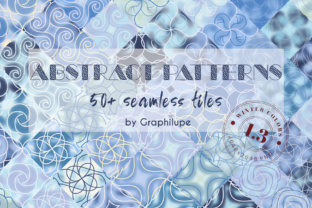
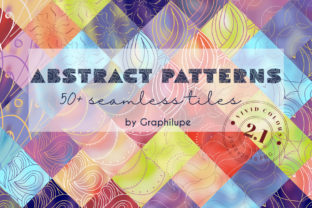
The patterns themselves lean into contemporary abstraction: rhythmic geometry, soft organic gradients, layered line work, subtle textures, and balanced negative space. Nothing feels dated or overused. They’re designed to support—not dominate—your content. A branding designer can use one as a subtle background for a business card; a textile artist can repeat it across a scarf mockup without visual fatigue; an educator can apply it to printable worksheets to add visual interest without compromising readability.
Where These Patterns Actually Get Used—and Why They Save Time
Here’s where Abstract Patterns Vol. 2.1 earns its place in your toolkit:
- Product design: Apply a low-contrast pattern to a phone case mockup to test how texture reads at small scale—then drop the same file into a label layout for a craft beverage brand.
- Apparel & textiles: Import directly into textile design software (like Kaledo or Adobe Substance) or use in Spoonflower uploads. The seamless repeat means no visible joins—even at 12”+ repeats.
- Branding & packaging: Layer a muted geometric tile beneath product photography to add depth without competing for attention. Its CMYK-ready nature means your printer receives files that reflect what you see on screen—reducing press checks and revisions.
- Web & UI design: Use CSS background-repeat or export smaller optimized versions (e.g., 400×400) for subtle site backgrounds, dashboard cards, or newsletter dividers. PNG ensures clean rendering across browsers and devices.
- Stationery & print collateral: From wedding invitations to conference handouts, these patterns add tactile sophistication. Try overlaying light type at 85% opacity on a mid-tone pattern—it creates hierarchy and warmth without needing custom illustrations.
Realistic Considerations Before You Start Using Them
Not every pattern suits every context—and that’s intentional. These aren’t “plug-and-play” clipart. They’re tools that respond to thoughtful application. For example:
- A bold, high-contrast pattern may overwhelm small text in a brochure but shine as a full-bleed background on a poster or exhibition banner.
- Some tiles include fine detail that resolves beautifully at 300 dpi on coated stock—but may soften slightly on uncoated paper or low-thread-count cotton. Always soft-proof before final production.
- If you’re designing for accessibility, test contrast ratios between patterned backgrounds and overlaid text. Several patterns in Abstract Patterns Vol. 2.1 include tonal variants specifically calibrated for legibility.
You’ll also want to consider tiling behavior in different software. In Illustrator, use Object > Pattern > Make to adjust spacing and brick offset. In Photoshop, Edit > Define Pattern works reliably—but avoid scaling the canvas before defining, as it affects repeat integrity. And if you’re prepping for embroidery or laser cutting, remember: PNGs don’t contain vector paths, so raster-based details won’t translate to stitch files without conversion.
How This Collection Fits Into Broader Creative Practice
For freelancers juggling five clients across different industries, having a reliable, license-cleared pattern set cuts decision fatigue. You’re not hunting for “free seamless background” results that come with watermarks or attribution strings. You’re not resizing mismatched assets or adjusting hue/saturation per project. With Abstract Patterns Vol. 2.1, you open one folder, pick a tile that matches the mood of the brief—minimal, energetic, grounded, playful—and move forward.
Entrepreneurs launching DTC brands benefit too. A cohesive pattern language across labels, shipping tape, and Instagram story templates builds recognition faster than standalone logos alone. Educators building online course materials find these patterns help differentiate module sections visually—without relying on stock photos that distract from learning objectives.
Even hobbyists gain quietly powerful advantages. Printing a favorite pattern onto iron-on transfer paper? The 300 dpi resolution holds up. Designing custom washi tape for bullet journaling? The seamless repeat ensures clean edges every time you cut. Creating limited-run zines? These files output consistently on both desktop inkjets and local print shops.
A Final Note on Long-Term Usability
Patterns age differently than photographs or illustrations. A strong abstract pattern stays relevant because it doesn’t tie itself to trends—no retro filters, no AI-generated motifs, no fleeting aesthetics. Abstract Patterns Vol. 2.1 was developed with longevity in mind: neutral palettes, balanced density, and intentional negative space mean these tiles won’t feel “of 2024” by 2026. They’re infrastructure, not decoration.
That makes them especially valuable if you maintain brand guidelines, build reusable design systems, or create templates for teams. One pattern can anchor a slide deck, reappear as a web background, then show up again on a trade show banner—all while feeling like part of a unified visual language.
So whether you're refining a luxury skincare label, prototyping a new app interface, or just adding quiet elegance to your next personal project—Abstract Patterns Vol. 2.1 delivers precision, flexibility, and quiet confidence in every tile.