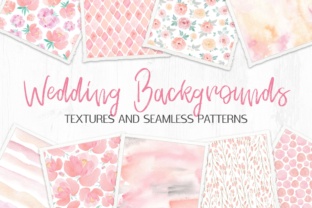
Wedding Backgrounds Textures and Patterns
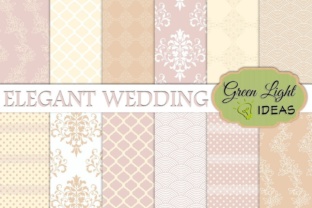
Thoughtful visual design isn’t decorative—it’s strategic. When you’re creating wedding-related materials—whether for your own celebration, a client’s brand, or a print-on-demand shop—the backgrounds you choose shape perception before a single word is read. Wedding Backgrounds Textures and Patterns offers a focused, high-resolution toolkit: six tender watercolor textures (2700×4000px JPG) and six seamless watercolor patterns (2500×2500px JPG). But its value lies not in quantity or aesthetics alone—it lies in how deliberately you apply it.
Why This Collection Fits Real Workflows—Not Just Aesthetic Trends
Watercolor textures carry softness, warmth, and handmade authenticity—qualities that resonate deeply in wedding communications, where emotional resonance matters more than polish. Unlike generic stock backgrounds, these are sized for real production needs: large-format prints, layered digital invitations, or scalable web banners. The 2700×4000px resolution supports crisp output at 300 DPI up to 9×13 inches; the seamless patterns allow infinite tiling without visible repeats—ideal for envelope liners, RSVP cards, or branded social media templates.
This isn’t about “adding prettiness.” It’s about reducing decision fatigue during tight timelines, maintaining visual consistency across touchpoints, and preserving brand voice—even when outsourcing design. For freelancers managing multiple clients, having a vetted, cohesive set of assets means less time sourcing, testing, and adjusting—and more time refining messaging, typography, and layout.
Strategic Use Cases Across Roles
Different goals demand different applications. Here’s how professionals use Wedding Backgrounds Textures and Patterns with intention—not instinct:
- Small business owners building a boutique stationery line use the seamless patterns as base layers for custom invitation suites—then overlay foil-stamped text or hand-lettered calligraphy. Consistency across save-the-dates, menus, and thank-you cards reinforces perceived quality and attention to detail.
- Wedding planners and coordinators embed the textures into digital mood boards shared with clients. Because each texture carries subtle variation—soft lavender washes, muted sage gradients, or warm ivory bleeds—they help couples articulate preferences beyond vague terms like “romantic” or “elegant.” That clarity shortens revision cycles and reduces scope creep.
- Educators and workshop facilitators teaching design fundamentals use the pack to demonstrate texture hierarchy: how opacity, blending mode, and layer order affect legibility and emotional tone. Students learn to ask better questions—“Does this background support or compete with the headline?”—not just “Does it look nice?”
- Bloggers and content creators repurpose the textures as subtle overlays behind quote graphics or Instagram carousels. Because they’re light on contrast and low in saturation, they don’t distract from text while adding tactile depth—improving engagement without sacrificing readability.
What to Consider Before You Apply
High-resolution files aren’t universally beneficial. Before dropping a texture into your next project, ask:
- What’s the primary action you want the viewer to take? If it’s scanning an RSVP deadline or clicking a link, avoid dense textures behind body copy. Reserve heavier watercolor washes for hero sections or decorative borders—not information-dense areas.
- Where will this live? A texture that reads beautifully on matte paper may appear muddy on a glossy brochure or washed out on mobile screens. Test at actual size and in context—not just in your design app.
- Does it align with existing brand elements? If your client uses bold sans-serif type and geometric icons, pairing them with a delicate watercolor background can create unintentional dissonance. Match texture weight to typographic weight: soft textures with thin fonts; bolder washes with medium-weight serifs.
- Is scalability built in? The seamless patterns solve one problem—but only if used correctly. Avoid stretching them beyond their native dimensions unless you re-tile programmatically. Manual scaling introduces pixelation and breaks the illusion of continuity.
Risks of Using Without Context
Applying Wedding Backgrounds Textures and Patterns without strategic alignment leads to predictable pitfalls:
- Visual noise over meaning. Overlayering textures, using multiple washes in one layout, or placing text directly over uneven pigment creates cognitive load. Viewers spend energy deciphering the background instead of absorbing your message.
- Inconsistent emotional signaling. A cool-toned, granular watercolor may subtly convey calm—but clash with a vibrant, joyful color palette elsewhere in the suite. That misalignment confuses audience expectations and weakens brand coherence.
- Operational friction. Using non-seamless textures for repeating elements (like border frames or website headers) forces manual cloning and edge-matching—slowing revisions and increasing error risk, especially under deadline pressure.
- Missed accessibility opportunities. Watercolor backgrounds often reduce text contrast. Always check luminance ratios (aim for ≥4.5:1 for normal text) and provide fallbacks—such as a solid-color version—for users relying on screen readers or high-contrast modes.
How to Build Long-Term Value From One Pack
A single asset collection gains compound value when treated as part of a system—not a one-off fix. Start by documenting how each texture functions within your workflow:
- Assign names based on use—not appearance. Instead of “Blue Wash #3,” label it “RSVP Card Base” or “Hero Banner Overlay.” This builds muscle memory and speeds future selection.
- Create a lightweight style guide snippet for each client: “Texture: Soft Blush Wash (from Wedding Backgrounds Textures and Patterns), used at 15% opacity behind headlines; never applied to body copy.” Clarity here prevents assumptions down the line.
- Batch-test textures against common fonts and color palettes you use regularly. Note which combinations reliably pass contrast checks—and which require adjustment. Save those pairings as presets in your design software.
- When onboarding new team members or contractors, share not just the files—but your documented decisions. Explain why you chose Texture #2 for digital invites but Pattern #5 for printed menus. That context transfers skill, not just assets.
Final Thought: Design Is a Series of Intentional Constraints
Wedding Backgrounds Textures and Patterns works best when it operates within boundaries—not as a creative crutch, but as a calibrated tool. Its strength isn’t in limitless possibility, but in focused utility: six textures, six patterns, all sized for production, all rooted in a consistent aesthetic language. That constraint frees mental bandwidth for higher-stakes decisions—how to phrase a vow reminder, how to structure a timeline graphic, how to balance elegance with clarity.
If your goal is efficiency without compromise—if you need reliability without rigidity—this pack delivers precisely what it promises: quiet, capable, and human-centered background foundations. Use it to support your strategy—not substitute for it.